Picture this. It’s yet another snowstorm, and you’re stuck in your home. It’s the ideal time to catch up on some of the movies and TV shows that your co-workers and friends have been chatting about for months. You curl up on your old reliable couch, fully equipped with your TV remote and a bag of chips. Netflix turns on, and the screen quickly becomes populated with endless thumbnails of interesting shows crossing numerous genres. However, there you are, completely focused on one particular thumbnail. It catches your eyes, and you know that that’s the one you want to watch. Yes! This is the same appeal that you need for your thumbnails on YouTube. In this video, I take you by the hand—and hopefully off the couch—to show you how to create custom YouTube channel thumbnails with Canva.
Your YouTube thumbnail will most likely be the first impression that people will get about your video. Viewers will make a quick decision on whether or not they want to watch your content based on the image that you are presenting. The thumbnail also suggests what additional videos from you, the content creator, are essentially like. This is why you need to create custom YouTube channel thumbnails.
Now, this is not the time to incorporate clickbait. Your thumbnails shouldn’t trick viewers … unless you really don’t want them to return to your channel! Instead, you should use these click-worthy images to attract viewers while familiarizing them with your brand.
If you are not a designer by trade, have no fear. In this video, I give you a tutorial on how to create a custom thumbnail using Canva, a free software. Watch, take notes, and drop comments or questions below.
Your YouTube channel is not only the home of your uniquely branded content, but it is also where you can leave traces of your brand’s essence. One place to begin introducing people to your channel is through your YouTube channel art. Through your channel art, you can showcase your channel’s mood, set expectations, and highlight the takeaways—mainly you! In this video, you’ll receive a step-by-step tutorial on how to create branded YouTube channel art with Photoshop.
Mood Setting
Tap into your brand’s color palette and douse your channel with it! Paint away and highlight the colors, fonts, and all of the elements that point to your brand. This is such a simple yet effective tactic for leaving tracing of you in people’s memory.
Great Expectations
By the time people click on over to your channel, they’re ready for a quick answer to their questions: What is this channel about? Who’s the culprit? What can I get from this? This is where your channel art should stand up and proudly answer all of the above. Let people know who’s the person behind the brand and how often they can expect to see you on camera.
Take It Away
The main thing that you want to focus on is to showcase what in the world your channel is about. Don’t leave ’em guessing. Sadly enough, most people who don’t know you will not to do the long, arduous leg work it’ll take to watch all of your videos and piece together what your channel is about.
This is also a reminder for you to share focused content that’s centered on a niche. Since you can’t be everything to everybody, your best bet for channel growth is to niche down. Your channel art is an ideal place to inform all visitors about the niche you are serving and what viewers can take away from your channel.
Come One. Come All.
You can start your branding by doing one of these things, but of course … I’m going to tell you to do them all! Now, there is a way to do just this by using sophisticated tools like Photoshop.
Before you backup and beginning fleeing, I walk you carefully through how to design your channel art in this video. To further help you, download the RAW BRANDED YouTube Channel Art Guide, so you can start styling your channel with the right specs.
You can also get Adobe Photoshop or the whole Create Cloud suite by visiting reneewalker.me/CreativeCloud (This is an affiliate link).
This video is the latest installment in a series on branding your YouTube channel in which I show you how to create branded YouTube channel art with Canva. In case you don’t know, there are several ways in which you can leave your unique mark through video. As I mentioned before, video is a solid tool for speeding up the relationship building process. This is partially due to the placement of a name with a face. The image goes beyond just what people say to really seeing your brand in action.
In addition to the video itself, there are a few ways that you can arrive in style, specifically on YouTube. As a leading video platform, YouTube is where you want to be. Aside from its popularity, YouTube allows you to incorporate your branding elements, including artwork for your channel. It’s all about leaving traces that allow you to remain memorable.
Once you land on a brand’s channel, you’ll see a banner right at the top of the channel. That’s a goldmine! It’s an immediate way for brands to highlight what they’re about and what people can expect when viewing their broadcasts.
Interested in learning just how you can showcase your brand on YouTube?
Discover how to create branded YouTube channel art in this step-by-step tutorial using Canva.
Tune in and drop your questions below. Oh, and don’t forget to check out the next video in this series.
I can’t stress enough just how effective video is for brand building. It goes beyond putting the spotlight on you to actually speeding up the relationship building process between you and your audience. Now before you jump on air, there are a couple of things you can do to showcase your brand. One of those things is to incorporate branding elements, including watermarks. On YouTube, a watermark serves as a reminder for viewers to subscribe to your channel. It’s a subtle cue to viewers in order to increase subscribers.
If you’ve been struggling with the creation of your watermark, there’s no need to stress. In this video, I use Canva.com to help you craft an ideal design. Oh, and you should note, this design can be created for freeeee! I also share my screen, so you’ll know just how to upload your watermark on your YouTube channel.
In case you’re looking to up your YouTube subscriber count, while making your brand more recognizable, this tutorial is ideal for you.
Watch and discover just how to create branded watermarks on YouTube. Chime in below.
A photo posted by reneewalkerpena (@reneewalkerpena) on
Is it a case of narcissism or is it just plain ol’ identity formation? However you define it, selfies have now become a part of our lives. Whether you or someone/some celebrity you know is engaging in it, at the very least you have heard the term before. Selfies are so omnipresent that they’ve found their way into the English Oxford Dictionary in 2013. Nary does a day go by when you won’t find your Instagram or even Facebook feeds filled with the homage to oneself: the Vogue-esk body angle, the dramatic head tilt, and well-rehearsed smile or smize are all the usual elements of the selfie.
When it initially gained steam a few years ago, I thought the selfie would become a quickly passing fad that would die hard. We would all look back the year after and tsk tsk our participation in the madness ala the word “bling,” but I was wrong! The selfie has taken on a life of its own, and as time goes on, it’s becoming normalized. There are now ways to incorporate successful selfie strategies into your marketing campaigns. What makes this style of photography so darn appealing? According to Psychology Today, selfies allow us to engage in the storytelling experience as both the subject and photographer. We get to become both the lead actor and director.
Self-ish v. Personal Branding
Millennials, aka what I like to deem as “Generation Me,” are often credited with giving birth to the selfie. They may actually have more pictures of themselves now than their parents even took of them as babies! But what’s the obsession?? For many of these young adults, teens, and even tweens it’s about self empowerment and/or esteem building. These self portraits also serve as a tool for chronicling a moment in time. Remember Ellen’s Oscar selfie in 2014? That moment in time reigned as the most re-Tweeted image, with more than 3.3 million shares, until 2016.
Regardless of the personal goal, the act of creating a selfie reinforces your personal brand. Selfies communicate your brand experience. They are a peek into who you are and what you stand for. It represents (or should represent) your authentic self, whether that is the intent or not. It gives social proof through the image itself and its popularity. The more likes, the better evidence you’ll have that your brand is working to build trust and credibility. Remember, people gravitate towards products and services that they trust, and pictures are found to increase trust, according to new research on increasing “truthiness.” Once you establish this relationship, you can reap the rewards found through sales.
Companies have caught on to the selfie trend and have been incorporating them into clever, low-budget, marketing campaigns. Most are based on having followers and/or customers post real photos of themselves with a product or embody a brand’s essence. Take notes, as these seven successful selfie strategies may also work for your marketing campaigns.
GoPro – Selfies are ideal for the photography industry. This seemed like a no brainer for GoPro, which created a viral marketing campaign by embracing the entertaining videos produced by its customers. While the effort began with the company’s partnership with extreme athletes, the company is now showcasing the works of its fans, which includes death-defying sky dives and bungee jumps. It’s user-generated content has yielded more than 3 million views and 3 million subscribers!
Strategy: Spotlight fans who embody your brand essence.
Dove’s campaign challenges traditional beauty standards.
Dove – The company continues to be consistently conscious. Sticking with its brand, Dove created the documentary #Selfie (2014) to showcase the unrealistic beauty standards young ladies face in a social media driven world. The 7-minute short encourages women to redefine these traditional beauty standards by becoming content creators.
Strategy: Use selfies to showcase your authenticity.
WIRED – Their February 2014 issue debuted with a unique spin. WIRED offered readers the opportunity to use an app that places them on the cover of its magazine. They also asked readers to them use the app to share the cover pic on social media, using #WiredGoesViral. Yes, you too could have been a cover girl/boy.
Strategy: Place your supporters front and center.
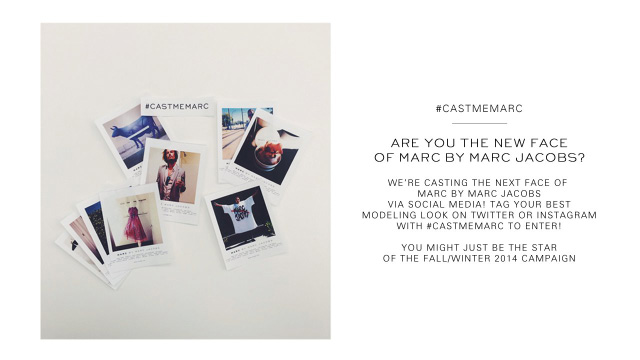
Marc, by Marc Jacobs – similar to WIRED, Marc literally sought out real people as models. Although the concept isn’t new (hello Banana Republic!) the designer’s execution was. His company created a casting call by asking fans to post selfies on Instagram and Twitter and tag them using #CastMeMarc. The campaign drew more than 70,000 applicants.
Strategy: Give back by showcasing your fans and their story.
Samsung – To promote its Samsung Galaxy S5’s water resistance feature, guess what the company did. Yep, you guessed it. The folks at Samsung embraced the underwater selfie, using divers in Lake Zurich to approach passersby with the S5 and entice them to join them in the lake for a chance at winning the phone. Strategy: Think outside the box to capture winning moments.
Beats – When debuting its Solo2 headphones, Beats used celebrities to take selfies of themselves going from one side of the headphone to the other. The images and videos were shared via Twitter and Instagram with hashtag #SoloSelfie, resulting in more than 9,000 posts.
Strategy: Use celebrities to ignite your audience’s support when possible.
Nokia Lumia 735 – The smartphone company launched “The Selfie Collection” as a means of using a “selfish” act to support an unselfish cause. The campaign featured self-taken images of famous Scandinavian fashion bloggers using the Lumia 735. The bloggers also donated a fashion item for an auction to support the fight against online bullying.
Strategy: As an alternative to celebrities, partner with digital superstars who can vouch for you.
The New Normal
Do I now have you convinced that there’s a method to all this madness?
If not, here’s one more attempt that showcases pop culture at its finest. Grab your selfie stick and enjoy the #Selfie song. Never gets old!
If you’re a small business owner, chances are you’re also the marketer, financial manager, designer, web manager, juggler, and fire-breather–all rolled up in one!
As discussed in the video above, the biggest issue for soloprenuers is being the end all be all. However, there’s only so much you can do in 24 hours, not counting the actually delivery of your products. In my interview with @TonyLBrownHQ from TonyLBrown.com, he outlines actionable tips that you can use to systemize your business for success.
Previously, we discussed the difference between systemization and automation. In that discussion, Tony emphasized the importance of having a personal touch in your automated processes. I’m pigging back on this to stress that your communications should be RAW BRANDED™. Even though someone else may be stepping into your shoes to help spread your messages, that message should be authentic to you and your brand. It shouldn’t appear as if you are being cast by a robot.
In this video, Tony L. Brown credits fellow entrepreneur and digital superpro Chris Ducker with outlining the items that you should be outsourcing. This includes: what you can’t do, what you don’t like doing, and what you should have been doing. If you have any of these items taking up the majority of your to-dos, it’s time to seek some help. You can do so by delegating tasks to a virtual assistant. Yes, it’s time to let go and put your trust in someone else. However, this will not be a scary feat if you lay out your systems.
Tony advises business owners to develop a staffing structure then recruit for the roles you have in mind. By creating a framework, your VAs will understand how to deliver services to your standards. Don’t get trapped by your creation. Systemize your business for success and for sanity!
Are you systemizing your business operations? Drop a comment below.
We use cookies to ensure that we give you the best experience on our website. If you continue to use this site we will assume that you are happy with it.